Tampilkan postingan dengan label Icloud Unlock Tool. Tampilkan semua postingan

Kamis, 02 November 2017

The Best And Free Option Quick iCloud ”DNS” Activation Lock Bypass iOS 10.3.3 To iOS 11

If you get an iPhone from the market used and you feel it requires the Apple ID and password to activate the device, it is very likely that a iPhone stolen. Unfortunately, you have no way to find out until you get the phone. But you can try these unlocking lock activation tips.
Note: This is a temporary solution to bypass the iCloud lock and access your iOS 11 device.
iCloud ''DNS'' Activation Lock Bypass
iCloud ”DNS” Activation Lock Bypass iOS 11
  1. Press the Home button, then select “Wi-Fi Settings”. In the Wi-Fi network list, touch the “i” symbol next to the WiFi network you want to connect to.
  2. After pressing “i”, you will be taken to the network settings. Delete the existing DNS and enter the new DNS according to your location:
  3. For users in the United States / North America, the new DNS is 104.154.51.7
  4. For users in Europe, the new DNS is 104.155.28.90
  5. For users in Asia, the new DNS is 104.155.220.58
  6. For users in another zone, the new DNS is 78.109.17.60
  7. After entering the correct DNS, press the “Back” button and click “Activation Help”.

Can I Bypass iOS 11 iCloud Activation lock Using Tools Online

There are a large number of iCloud Lock Bypass Tools online. Unfortunately most of them are just scams. In fact after testing all and taking into consideration our visitor reports I discovered a single iCloud Locking Removal Tool iCloud Account Unlock Online. But even this one will not work all the time. I personally tested it with 4 iPhones iCloud Locked an iPhone 5, an iPhone 6, an iPhone 6 and an iPhone 7. iPhone 5s and 6 were iCloud Unlocked, but iPhone 6s and 7, 7+ remain locked. The 50% success rate is not bad but in my opinion there is another way to bypass iOS 11 iCloud activation lock a way to keep both parties happy you and the original owner of the iPhone.

Instructions for Factory iCloud Unlock for iPhone 7, 7+, 6S Plus, 6S, 6, 6+, 5S, 5C, 5, 4S, 4

  1. To start with iCloud Lock Unlocker, go to the official site by clicking the link here.
  2. On the website you will receive an online form. Fill in the blank fields with the required details and confirm.
  3. At this point there is not much you can do because you have to wait until you receive a confirmation email for which the iCloud issue has been resolved and your old and locked iCloud account has been deleted.
  4. Now you can safely create a new Apple ID account with a new password that later you can use safely.
  5. Congratulations, you have safely Unlock iOS 11 iCloud Activation Lock.

What Does This iCloud Bypass Activation Software Do

  • Debilitate the “Discover My Phone” highlight and reset the iCloud account
  • Characterize another iPhone IMEI, essential base iPhone CHeck
  • Fix a few issues and issues
  • Give you full access to the record framework on iOS 7 Up to iOS 11.0.1
  • Enables you to introduce any uses of your decision
  • You can update the iOS 11 rendition, match up iPhone/iPad utilizing iTunes without dread of being bolted again iCloud.
  • Tried and running on iPhone 7, iPhone 7 Plus! IPhone IMEI Sniffer
  • iCloud Secure and Reliable Removal Tool.
You can now unlock the iOS 11 iCloud lock only with this service that the iCloud Remover Company offers. You can easily ignore your iCloud lock and it works for all iPhone models of iPhone 7, 7 plus, 6s, 6s plus, 6, 6 plus, 5S, 5C, 5, 4S, 2 to the oldest and no matter where you bought it because this service can Help Delete Locking the activation screen or locking the iCloud account permanently.

iCloud activation Bypass tool v1.4 100% Working Free Download

Download iCloud activation Bypass tool v1.4 100% Working Free

There is a lot of tools that can help you remove iCloud activation on your iPhone or iPad. This iCloud activation bypass tool v1.4 is very easy to use.
  • Just Download and install the tool on the computer.
  • Run the app and connect your iPhone or iPad to the computer using a USB cable.
  • The tool will now scan your device and read the IMEI number.
  • Click Bypass Activation Bypass and wait for the process to complete. The tool will use your IMEI number to connect the device to the Apple servers, and then delete all linked iCloud accounts. iCloud activation Bypass tool
Once the process is complete, disconnect your smartphone and restart it. You will see that the iCloud lock has been permanently removed and iCloud is no longer required to use the device.

Bypass iOS 7.1.2 Activation Lock & Jailbreak iPhone 4

Smolk, a Russian developer, has a found a workaround for the remote iCloud activation lock function for devices running iOS 7.1.2, 7.1, 7.0.6, 7.0.4, 7.0.3 and below. He lately presented a new program will not only allow enables him around the iCloud activation lock, but also jailbreak iOS 7.1 / 7.1.2. The process is only for iPhone 4, but certain conditions have to be met.
bypass icloud activation iphone 4

Bypass iCloud Activation iOS 7.1.2 iPhone 4

For example, the phone has to be renamed through iTunes as a ‘new device’ and the password has to be disabled. Then bypass iCloud activation lock process has to be executed before the jailbreak is performed.
bypass icloud ios 7.1.2
Tool to Bypass iCloud Activation on iPhone 4 iOS 7.1.2 – 7.0

Steps to jailbreak iOS 7.1.2 along with iCloud activation lock bypass

Step 1: Make a download from the link for jailbreaking iOS 7.1 / 7.1.2. The file works with Windows XP as well as Windows 7 and 8.
To download the iOS 7.1.2 / 7.1 / 7.0 iCloud Activation bypass & Jailbreak tool go to this official download link. After that, move to step 2.
Step 2: Now connect your iPhone 4 to the computer, launch the program and selected ‘tethered jailbreak iOS 7 for iPhone 4’.
Step 3: Now click the button that says ‘1) Run SSH_RD Tool’.
bypass iPhone 4 Activation
Run SSH_RD tool to bypass iPhone 4 Activation Lock
Step 4: Now wait for the window RD_tool to launch, and then switch your device into DFU-mode.
Bypass iCloud iPhone 4
Connect a device in DFU mode to Bypass iCloud on iPhone 4
Step 5: After the process has finished, now press ‘2) Run SSH Connect’. At this point, you also need to make sure that the disc is mounted. See the following:
  • Mounting/ dev/disk0s1s1 on /mnt1 ..
  • Mounting / dev/disk0s1s2 on /mnt2 ..
Otherwise, you can select ‘2) Run SSH Connect’
Step 6: Now select ‘jailbreak data send’, and wait for the popup that says ‘Continue connecting and add host key to the cache?’. Select Yes ‘Y’. The phone will now reboot in recovery mode.
iphone 4 icloud bypass
Step 7: Now press ‘tethered boot iOS 7.1 / 7.1.2 iPhone 4 Model: 3.1 or 3.2 or 3.3’ to boot the phone depending on your model; find the iPhone model with the image number in the window.
bypass icloud activation iOS 7.1.2 iPhone 4
Jailbreak and Bypass iCloud activation iOS 7.1.2 iPhone 4
bypass iCloud Activation
Jailbreak – Tethered Boot and Bypass iCloud Activation on iPhone 4
Step 8: After downloading, do not do anything before the device automatically reboots. Cydia will be installed.
Step 9: After that, you need to wait for respring. This is when mobilesubstrate will be added.
Step 10: Now feel free to open Cydia and install any updates.
Now upon every reboot, you need to connect iPhone to the computer and select ‘tethered boot iOS 7.1′, as it is not an untethered jailbreak’.
Update 1: Bypass iCloud activation lock tool works on iOS 7.1.2 and iOS 7, but if your phone is reported as stolen you won’t be able to make calls. Did you managed to bypass iOS 7.1.2 Activation Lock on iPhone 4? Tell us in the comments below.

Hacker Deactivate iCloud iOS 10.4 Bypass Activation Updates 10.4.1, 10.4.2

Apple seeds Latest update with beta versions iOS 10.4, We have more and more update about deactivation iCloud iOS 10.4 Bypass Activation and real solution for completely remove iOS 10.4.1, iOS 10.4.2 iCloud Account. Smooth iOS 10.4 iCloud Bypass Activation is An Enormous Facility The world’s leading excessive iCloud Server is we by means of currently identify iOS 10.4 iCloud Bypass Activation Server DoulCi Activator. DoulCi Activator iOS 10.4 iCloud bypass activation’s well make active your iOS 10.4 device in aid of you once you are crushed at the Apple iCloud activation menu.  Consequently, why would you facility iCloud Unlock Server? For example, if you put away inappropriate Apple developers ID in addition important. Level however iOS 10.4 iCloud is a huge capability; it is not essentially inoffensive as now are countless authentications which settle that iCloud capability know how to be present at changed optimistic your portrayals moreover supplementary stylish documents perhaps determination be situated occupied. These tips to a collection in stealing, formerly it strength assistance your application in numerous supplementary methods. Afterward such renovation is not wholly imperiled in addition to that unvarying a 3rd assembly can lock your phones optimistic practice it in the best interests of their distinct technique, over whelming DoulCi Activator iOS 10.4 devices know how to be there a generation caring.

In aid of the iOS 10.4 pause lock clienteles Apple ID as well keyword are obligatory to turning come across my iPhone in addition energy of iCloud on your iPhone otherwise iPad apparatus. Customer is talented to be present iCloud Bypass iOS 10.4 activation fortification device inconclusive partition throughout iCloud ID Remover essentially as well as prompt. iphone procurer must be present located caring of a repetition to have been determined by means of motive of hackers to remove icloud Lock iOS 10.4 opening documented as the doulci activator. It is not at all curiosity why numerous individuals’ effort to iOS 10.3 iCloud bypasses activation. The limits that originate through it are essentially incomprehensible through completely pointless.  Everyone requirements to understand that blue display on their iPhone suggesting the finish of their phones. Now the section takings an added chance, presently you can overlook approximately the deadly blue display.  What the Doulci Activator developers Lineup does is remove iPhone workers “Apple ID” identifications by means of the faintness in iTunes on behalf of Windows on the newest iOS 10.3.1 bring up-to-date.

iCloud Email Apple ID or Password

If you happen to have lost your iCloud email ID and password, worry not because they could be restored. However, have the password or user ID restoration job while everything is in their safe state – like your Apple device is not lost or stolen and you can still remember few credentials like your alternate email address and its password which you used to create an iCloud user ID – things like that.
Because if you forget everything and accidentally lose grip of your iPhone (read ‘your iPhone gets stolen’), you would certainly be in a deep sea without a submersible. You don’t want that!
Find iCloud Email

Brief Overview on iCloud

iCloud is a cloud computing service offered by Apple, exclusively for the Apple device users. The basic objective of this platform is to provide a common syncing platform where all Apple devices logged in with a single Apple ID would sync all the data and all the files will be available in all devices if sync is turned on.
There are other features like data backup and storage, security etc. iCloud activation lock has been introduced since iOS 7 in order to prevent theft of iOS devices. iCloud lock blocks a device if it’s been marked theft or stolen from the online interface of iCloud.
Find iCloud Password
Enter your Name and old email to reset iCloud Password

How to Find Lost iCloud Password (Apple ID password)

Retrieving a password isn’t very difficult when you actually remember what email address you have used as an Apple ID. Answering few security questions or maybe some other authentication method is all it takes, however as an iCloud user the user needs to remember at least few credentials of the account they had created earlier. The steps are:
  1. Head over to this link to initiate the password retrieval process. This is the specified Apple domain for retrieving forgotten passwords.
  2. Middle of the page loaded, there’s an email address box with a placeholder ‘name@example.com’. That denotes the email address format user have used while setting up an Apple ID or iCloud ID. Enter the exact address that’s been used earlier; mismatch in this field will result in blank results or inappropriate findings.
  3. Options for ID verification would show up on screen. A security question may be asked or an email notification might come to your cellphone, depending on what password retrieval method had been chosen earlier while you made the email address. Email and security question are the available verification methods.
  4. After the verification method is properly done, user will be guided through their new password retrieval method.

How to Find Lost or Forgotten iCloud Email ID

To find a forgotten or lost iCloud / Apple ID, following steps need to be followed:
  1. Go to the same link as mentioned in the previous guideline.
  2. Don’t enter an email ID in the field, rather click on the ‘Forgot Apple ID?’ button right underneath that blank field.
  3. Upon clicking on that button, a new screen with three fields ‘First Name’, ‘Last Name’ and ‘Email Address’ will appear. Fill them up with the last known correct punctuation and click on Continue.
  4. Depending on your input, Apple website will look for a match in the credentials. If found, you will be asked to verify your identity via answering the security questions or using the email verification.
Read Also: Delete iCloud Account from iPhone or iPad Without Password

Conclusion

Though restoring access to an Apple / iCloud ID isn’t really very tough, but it’s very crucial that every Apple user remember their security question and verification email address.

New Tool to Hack iCloud Password & Disable Apple ID

A hacker has created a solution that can be used to hack iCloud password. It’s called the ‘iDict’ tool. It utilizes an exploit in Apple’s security to bypass the restrictions. On the Github page of iDict, a user name ‘Pr013’ sated the exploit that was behind this tool was ‘painfully obvious’ and it was just a matter of time before hackers started using it to gain access to iCloud accounts.
hack icloud password

The description of the iCloud hacking tool says the following:

“100% working iCloud Apple ID dictionary attack that bypasses account lockout restrictions and secondary authentication on any account.”
While there’s no information that iDicit is indeed functioning, users on Reddit and Twitter have claimed to use the tool and report that is works well.

Here’s what the tool looks like when being used:

hack apple id password
Apple implemented several ways to prevent criminals from hacking its iCloud service. The company stopped people from guessing passwords again and again by putting an end to “brute force” attacks. Then Apple also enabled users to verify login attempts with the aspect of two-factor authentication using their smartphones. But iDict has been reported to bypass those security implementations.
If iDict does indeed work as it has been reported, there’s very little an iCloud account owner can do to protect his/her account. The tool wants users to enter the email address related to the iCloud account before anyone tries to gain access. So a way to make your iCloud account before secure is to use an email that hasn’t been shared online.

How to use the tool to hack iCloud password

The tool use a list with 500 most used passwords to hack the iCloud account.
The iDict script must be hosted on your hosting or localhost using Xampp server. You can easily download the iCloud hacking script & follow the installation guide on Github.
Moving on, there’s a buzz about why the hacking tool was released in the first place. When researchers uncover an exploit in a software, they usually report privately to the vulnerable company to prevent widespread use by hackers.
This is the same service that hackers exploited last year to leak naked images of hundreds of online celebrities. Stars like Kate Upton and Jennifer Lawrence had their iCloud accounts compromised when hackers bypassed Apple’s security questions. The company later bumped security to prevent access to accounts.
Let’s see what Apple does in this case.

Official iCloud Removal Service to Bypass iCloud Activation

Are you owner of a iCloud Activation locked iPhone, iPad or iPod Touch or bought one second hand? The locked word basically means you can’t use it because of the iCloud Activation Security feature. But that doesn’t have to be the case anymore, as a new iCloud removal service has announced that it can provide a solution for bypassing iCloud Activation lock and let you use the device.

Official iCloud Activation Lock Removal Service

You might be aware of the new tool, which was created by two hackers known by doulCi. The tool went viral quickly as it is a free and test-proven method to bypass iCloud activation and unlock the iPhone (please note we are not talking about network unlock). However, customers were facing issues as doulCi servers were offline most of the time.
So if you want a new and proven method, check out the solution that was posted on our website. Unlock the doulCi servers, which were available for free, this solution will cost you money. You can try the Official iCloud Activation Lock Removal tool by going to this link.
But unlike the previous iCloud removal service, the new solution has some caveats. One of them is that with the solution, you won’t be able to bypass iCloud activation if you own an iPhone that is found as lost or stolen. Secondly, it will only be usable to bypass iCloud activation lock, and won’t unlock your device as our IMEI factory unlock solution does to use on any carrier in the world. We repeat it is not networking unlocking.
icloud unlock service
Bypassing iCloud activation is a blessing in disguise for those who bought a second hand iPhone and the previous owner still has his/her credentials stored as they forget to restore the device. If you want to use the device again, you need to unlock it using a iCloud removal service online.

Follow These Steps to Bypass iCloud Activation Lock

Step 1: Visit the Official iCloud Activation Lock Removal website.
Step 2: Find and Send the IMEI code for your iPhone or iPad.
Step 3: Wait for the confirmation email titled ‘Activation Lock Removed’.
Step 4: Congrats, now you can add the new iCloud account + Find my iPhone option is disabled.
After the completion of the process, you can set up a new device with a new Apple ID before iCloud Activation Lock is removed and the option for Find my iPhone is deactivated. The iCloud removal service works for iPhone 6 Plus/6/5s/5c/5/4s/4 and iPads.
After the process comes to an end, you can set your new device with a new Apple ID account before iCloud Activation Lock is removed and the option for Find my iPhone option is disabled. You can enjoy your new iPhone 8 Plus, 8, X, 7 Plus, 7, 6S, SE, 6 Plus, 6, 5s, 5c, 5, 4s, 4 or any iPad model. Go to this website to remove the iCloud activation lock today

How to Bypass iCloud Activation iOS 11 on iPhone and iPad

You know, I personally feel there’s no need to spend more money if you have a bit more technical skills than the average Joe. You need to have some knowledge to take full advantage of the specs of iPhone and its software. The conventional way of using iDevices is quite boring and doesn’t do the trick when it comes to Bypass iCloud Activation iOS 11 on iPhone 7 Plus, 7, 6S+, 6S, 6+, 6, SE, 5S, 5C or iPad.
bypass icloud activation ios 11
However, I’m aware that you get a sinking feeling as you’re not equipped with some technical skills. Don’t worry! This article explains how to bypass iCloud activation iOS 11 via a ritual DNS server by modifying the DNS IP Address of your WiFi.
A little on iOS 11: iOS 11 beta was recently seeded to public testers. The firmware itself is a huge update for the iOS world. Slated to be released in fall, it will come with a revamped Control Center, plenty of Siri improvements including realistic voice integration, new image filters, redesigned App Store, new storage optimization feature, and a lot more. We’ve also heard whispers about the iOS 11 untethered jailbreak, though it looks like a long shot.

iOS 11 Bypass iCloud Activation Lock

Do note that the method we mentioned isn’t evergreen. However, you can use it to get the job done while it’s possible. Apart from that, users can use the activation locked product in the account to bypass iCloud activation lock and surf games, internet, videos, apps, etc. on their iPad or iPhone with iOS 11 installed.
And don’t have any second thoughts. The method has been applied on iPhone 7 Plus, 7, 6 Plus, 6S Plus, 6s, 6, 5s, 5c, 5, 4s, and 4 as well as iPod Touch and iPad on firmware iOS 11, iOS 10.3.2, iOS 10.3.1, iOS 10.3, iOS 10.2, iOS 10.1.1, iOS 10.2.1 beta, iOS 10, 9.5.3, 9.3.3, 9.3.2, 9.0 and below firmware. In a nutshell, it works. Continue reading to bypass iCloud Activation Lock on iOS 11.

Steps to bypass iCloud Activation iOS 11

  1. Open your WiFi Settings and change DNS server to 78.109.17.60 or enter another IP address.
  2. Take your locked iPhone or iPad and head to the last activation step and choose “Activation Help” so that your device reboots via the ritual website. Now you’ll have options to watch movies, browse the web, play games, and do more.

Steps to completely bypass iCloud Activation iOS 11

  1. Go to “Applications” choice and select “Crash Test 1” to reprise your things.
  2. Head to WiFi Settings and select “I” and choose “Manual” option over the zone saying “HTTP proxy”.
  3. Now list 30 emoji icons (distinct) to “Server” and over “Port” zone type “8888”.
  4. Choose “Back” and “Next”, and do slide to unlock. Then choose “languages”. Don’t click only, rather click on continuously for a few minutes to boot it over the screen.
  5. When the home screen shows up, three options will be available: Facetime, Newsstand, and Phone.
  6. Now hold the Home and Power button each time you start and application to restart iPhone and facilitate the process.
  7. Now sift through Facetime where the mail of the last owner of the device will be. You can contact that person through that mail and inquire if the device can be taken off from iCloud. If you fail to find the mail, continue with bypass process and see the iPhone Phone app to see if the contact number of the concerned owner is available.
ios 11 activation lock bypass
iOS 11 activation lock bypass using DNS IP

Bypass iCloud Activation iOS 11 – iCloud Removal & Unlock

If the above mentioned steps fail to get the job done, you can always take services of a company that bypass, remove, or unlock the iCloud Activation in iOS 11. Here are the best companies in our opinion.

1. iPhoneIMEI.net

This is one of the best companies that you’ll ever come across. They are capable of unlocking almost every model of iPhone. And what’s fascinating is that they provide complete unlocking within a day or two. Customer support is also top-notch, with most queries answered within 60 minutes.
unlock icloud ios 11
Unlock iCloud Activation on iPhone or iPad running iOS 11
The pricing is the same as the pricing of Official iPhone Unlock – $50 for an unlock. It’s also a UK based company, so you’ll be charged in British Pounds. However, the global operation provides service worldwide and accepts payments in all currencies (of course, conversion fee applies).

2. Official iPhone Unlock

We’ve posted about them in the past. They manage to unlock many phones, expect older variants like iPhone 3GS. They can unlock your phone in 2-5 days, and offer great customer support. Go to this link here to use their services.
icloud bypass ios 11
Official method to unlock iCloud activation lock on iPhone running iOS 11
You have to pay $50 for unlock, but payment structure is different. Upfront payment is $16, with the rest of the $34 due after the unlock is complete. The company accepts a wide variety of payments including credit card, and functions globally.

3. IMEICodes

This is our last pick on the list, however the bad news is they are no longer doing iCloud removals. Also, they struggle to unlock most iCloud accounts. Those who have already gone through this option know the struggles of this company. Refunds are difficult to get as well.
We hope that you found this bypass iCloud Activation lock article helpful. Please do share it with your friends and family because they may be looking for iCloud removal iOS 11. Sharing also encourages us to write more on the little bugs iPhone users face on a daily basis.

How To Fix SIM Card Not Supported While Unlocking your iPhone

Finally today the unlocking solution for your iPhone is out. Now you can unlock your iPhone 4 baseband 4.11.08 totally free, thanks to the Chinese hacker called loktar_Sun. Find out how to fix SIM card not supported Error while unlocking your iPhone 4 baseband 4.11.08 after the break.
sim card not supported

Fix SIM Card Not Supported Error

SIM Card Not Supported error occurs when you connect your iPhone to iTunes which is necessary to re-activate your iPhone. However when trying to activate it, a note is displayed stating “The SIM card inserted in this iPhone does not appear to supported“. Follow our Step by step Guide How to Fix this error:

Before you start, please note that:

  • You need to recognize which carrier your iPhone is locked to.
  • Installed SAM from Cydia. Here is our guide how to install Sam.
STEP 1: Firstly you need to check out whether you’ve installed correct version of SAM. To get this done simply go to Settings -> SAM -> Utilities and tap on “Revert Lockdown to stock” button. Some text will appear showing stockification success. If you receive that notification which means you have got the right version or not. If a failure notification pop ups, you need to install SAM from original source.
sim not supported iphone
The sim card inserted in this iPhone does not appear to be supported
STEP 2: Go to SAM preferences and tap on “Method” now select “By Bundle Name”. Now head back and tap on Bundle menu and select your carrier that you are locked to.
STEP 3: Now head over to SIM ID and select your SIM ID, if not sure just select the first one.
STEP 4: Now go to More Information and you will see ActivationState as Unactivated.
STEP 5: Now It’s the perfect time to plugin your iPhone to your computer. Once you’ve plugged it in, you will notice that your ActivationState has changed to WildCardActivated.

Related Sim Fixes

  • Fix No Sim Card Installed Error
  • Fix No Service error on iPhone
  • Fix Sim Failure Error on iPhone
Now you should have your iPhone unlocked and working on any network on the planet! Share this Guide, and Feel free to ask any questions in the Comment section below!

Unlock Disabled Apple ID – Restore Apple ID Locked for Security Reasons

We all know that security is a top priority for Apple, and if the user’s account has been hacked it gets suspended. A message stating that your account has been ‘locked for security reasons’. This is bad as your Apple ID and password are needed throughout the network of Apple services. Read on to know how to unlock disabled Apple ID for security reasons.
disabled apple id

How to Unlock disabled Apple ID for Security Reasons

So it is inconvenient if your Apple account gets locked, especially if you’re trying to download the latest app from the App Store or trying to reply to an email. However, this does mean someone tried to log in to your Apple account, and Apple stopped them. The Apple ID gets locked when someone enters a wrong password multiple times.
apple id disabled for security reasons
Apple ID Disabled – Your Apple ID has been disabled for security reasons
Here’s what you can do to unlock a disabled Apple ID and account that was locked due to security issues.

How to know if your Apple ID is locked?

If you think your Apple ID got locked, one of these alerts should appear:
  • You can’t sign in because the account was deactivated for security reasons.
  • Your Apple ID has been disabled for security reasons.
  • This Apple ID is locked for security reasons.

What you can do if your Apple ID was locked?

unlock apple id
Unlock Apple ID account that was locked for security reasons
  • Take your Mac and launch Safari.
  • To unlock your Apple ID visit the ‘iForgot’ Apple’s website.
  • Enter your email, first name and last name -> select ‘Next’.
  • If two-step verification was enabled you need to put in the recovery key. If this was not enabled skip to the later step. Then you should print out the recovery key and store it somewhere safely. Enter the key number and select ‘Next’. Now choose the phone number that was used for two-step verification and select continue. Enter the Verification Code and select ‘Continue’.
  • Enter the new password and confirm password field -> select Reset Password.
unlock apple id account
You can’t unlock Apple ID without changing password – Create a new password
And that’s all you need to do to resent your Apple ID’s password. This unlocks the disabled Apple ID / account. However, you need to use the latest password with accounts on your Mac and iPhone.

For unlocking a disabled Apple ID: Update the password on your iDevice.

Follow these steps to update the password:
  1. Select Settings -> iCloud -> Edit (if asked) by tapping on it.
  2. Enter the new password and select ‘Done’.
Read Also: How to Delete iCloud account without password

And for updating the password in Mac OS X

  • Launch System Preferences by going to Apple menu and then System Preferences.
  • Select iCloud -> Sign Out.
  • Enter the new password and choose Sign In.
You would also need to enter the new password as needed in App Store, iTunes, FaceTime, and other Apple offerings. These should request the password as needed and then for later, remember the new password. We hope this post was helpful to you.

How to Turn Off Find My iPhone Remotely from iCloud

Find My iPhone, which works in synchronization with Activation Lock – the anti–theft system used by Apple, should be switched off from your iCloud account before you dispose or sell your old iPhone. This synchronization also helps when you don’t remember your passcode have been locked out of the device, or if you want to restore an old backup of iTunes, and if you want it removed from iCloud devices’ list. Today we are going to teach you how to turn off Find My iPhone remotely and remove devices from your iCloud account.
turn off find my iphone remotely
All these features will work, provided they are activated.
It is very easy to deactivate Find My iPhone by simply making some changes in the Settings of your device. There are two ways to do that, first by going to Settings – Find My iPhone and turning it off. The second way is to switch off iCloud.
But if you don’t have access to the iPhone because the passcode is lost, the new user can’t activate it, and there’s no way for you to get it, or you can’t restore from an old backup of iTunes. Fortunately, a method is available to deactivate Find My iPhone remotely from PC or other iOS devices. This also works with iPads and iPod touches – Find My iPad and Find My iPod options.

Turn Off Find my iPhone Remotely With the help of PC

disable find my iphone remotely
Select your device to Turn Off Find My iPhone Remotely
This won’t work from an iOS device’s internet browser; iCloud’s desktop version isn’t friendly on mobile. Follow these steps instead.
  1. Switch off the device. The iDevice should be offline if the process needs to be complete. If it’s with someone else apart from you, ask them to switch it off.
  2. Head over to iCloud’s Site – go to iCloud.com on your PC”s web browser and use Apple ID to sign in.
  3. Start Find iPhone – Click the icon “Find iPhone” from the current iCloud apps after signing into the account.
  4. Choose The Device – On the top of the page that follows, choose “All Devices” and then the device on which Find My iPhone should be disabled.

Steps to Disable Find My iPhone Remotely from iCloud.Com

First Option: Erase iPhone:

  • Use “Erase iPhone” from the info window that shows if you gave iDevice to someone. IT will remove the Activation Lock and Find My iPhone.
  • Select “Erase iPhone” if the passcode was lost; no way to access with iTunes restore or factory reset your device. Follow the instructions that appear to go through the process.
erase iphone remotely
Disable Find My iPhone and Erase iPhone Remotely

Second Option: Wipe From Account:

  • Choose “Remove from Account” if you already erased and iPhone is with someone else. This will also remove the device from iCloud devices’ list. Click “X” icon beside the device name in “All Devices” if previous option doesn’t show.
  • Select “Remove” to confirm all. Now the device can be activated by another user. Removing it doesn’t do anything if the device is with you, as it shows in Find My iPhone when an internet connection is formed.
remove iphone from icloud
Remove the device from your Account to Turn off find my iPhone Remotely

Video Guide on How to Remotely Disable Find My iPhone

Read Next: How to Find a Dead iPhone Without Battery

Alternative Method: From Some Other iDevice

If multiple iDevices are owned by you, use the Find My iPhone app to remotely disable Find My iPhone. Start the app, sign in Apple acc, choose offline device, choose “Remove” or “Erase iPhone”, and follow rest of instructions.

Unlock iCloud Activation Lock iPhone 7 6 Plus 6 5S 5 5C 4S 4

Did you recently purchased a second-hand iDevice or already own one and you want to unlock iCloud activation lock? The locked word in this context is referred to not being able to use you iPhone, iPad, or your iPod Touch because of the iCloud Activation Security Feature. If you are worried that your money has gone to waste, don’t worry anymore! Today we are going to teach you how to unlock iCloud lock and use your device again.
unlock icloud
Recently a new service has been announced that will unlock your device by bypassing the iCloud Activation lock that will fully unlock your iCloud locked device and allow you to add a new iCloud account to your iPhone or iPad.

How to Unlock iCloud Locked iPhone 6 7 6S SE 5S 5C 5 4S

Two hackers by the name doulCi recently introduced a new tool which most you might be aware of as it went viral in few days since it was free to use and was a test-proven method to bypass the iCloud Activation feature, which would unlock your iPhone (please note we are not talking about network unlock). However, due to doulCi servers being offline most of the time, some customers started to face issue with this tool.
Therefore, this new test-proven alternative being provided by the Official iCloud Unlock service is another way you can bypass and unlock iCloud Activation lock. However, unlike the service provided by doulCi which is free of cost.
unlock icloud lock
Unlock iCloud Lock iPhone 7 6S 6 SE 5 5C 5S 4S by IMEI code
There are some restraints of using this newer service as compared to the one offered by doulCi. If your phone was reported lost or stolen, you won’t be able to use this service to bypass the iCloud Activation lock. It should also be noted that this service will only unlock the iCloud Activation lock and will not unlock your iPhone, which is done using our IMEI factory unlock solution. Again, it is not a network unlocking.
Since some people can forget to reset their devices and sell an iCloud Activated locked device, this service bypasses through that security feature.

4 Steps to Unlock iCloud Lock on iPhone or iPad

  1. Visit the Official iCloud Unlock website.
  2. Locate your device’s IMEI and enter it on the website.
  3. You will receive a confirmation email titled “Activation Lock Removed”.
  4. Hurray! your find my iPhone feature is now disabled and you can also add a new iCloud account.
unlock icloud activation
Unlock iCloud Lock – Activate iPhone after the process

Compatible Devices to Unlock iCloud Activation Lock

  • Unlock iCloud Activation on iPhone 7
  • Unlock iCloud Lock iPhone 6 and 6S
  • Unlock Activation Lock on iPhone 5S, 5C or 5
  • Unlock iCloud Locked on iPhone 4S or 4
  • Unlock iCloud Lock iPad (All models)
This is the list of the compatible devices that can be unlocked using the official iCloud unlock service. However, any iOS firmware version can be unlocked, including the latest iOS 10.3.2 version. This service is compatible with the Clean IMEIs only – devices that are marked as lost, stolen or erased, can’t be unlocked with this service.

Related Articles to unlock iCloud locked devices:

  • Semi Bypass iCloud Lock
  • Bypass iCloud Activation iPhone 4
  • Legally unlock your iCloud Locked iPhone
Once the iCloud activation lock is removed and the find my iPhone feature has been disabled, you can add your own Apple ID and start using your iPhone. This tool works for iPhone 7/6+/6/5s/5c/5/4s/4 and iPads.

How to Check if iPhone is Unlocked or Locked Via IMEI Code

You may already be aware that unlocked iPhones can work on any network carrier with a compatible SIM. This is the main reason why they’re high in demand by both local and international users. Any GSM carrier becomes compatible just by changing SIM cards. However, there can be confusion when you hold an iPhone because a glimpse won’t inform that it’s compatible or not. Read on to know how to check if iPhone is unlocked or locked.
check if iphone is unlocked

3 Methods to Check if iPhone is Unlocked or Locked

There are three ways through which you can find out whether your device is a factory unlocked or is locked. This is handy when trying to buy and sell iPhone, or borrowing an iPhone from a friend for traveling.
There are some things you need to note before looking at the ways to determine whether your iPhone is locked or not. If your device was purchased from a network carrier, it’s likely to be locked, unless it was unlocked by the carrier. There are CDMA carriers that can unlock the device even when it’s in contract.
You may also be able to request the unlock if when the contract has ended. If your device was directly purchased from an Apple store, all you need to do is insert a SIM of your choice because it’s likely to be unlocked already. Here are the ways you can check the unlock status of your iPhone.

#1: Check iPhone Unlock Status Through SIM Cards

iphone unlock status check
The simplest solution for checking the unlock status is to take out the current SIM and insert SIM from another network carrier. After waiting for a while, you can see if the phone receives carrier service.
For example, when you’re in U.S., you can insert an Verizon SIM into an AT&T iPhone to check if it’s unlocked or not. If it gets service, it means your phone is unlocked. You can easily borrow a SIM from friend for the purpose or ask the carrier store to activate your iPhone.

#2: Web Service to Check if iPhone is Unlocked or Not

check iphone unlock status
If you’re having a tough time in getting access to another carrier SIM, you can use the IMEI web info service to check the unlock status of your iPhone. However, you’ll need to like a Facebook page before doing so. That is quite easy and the service will be quite handy in determining the status:
  • Dial *#06# on your device to find the IMEI number (don’t worry, your device won’t make a call but make sure that its active). If this doesn’t work, check iTunes, the back of your iPhone or the SIM device card slot.
  • Go to the official iPhone IMEI checker. Enter the exact IMEI code, hit ‘Enter’. It may take a while for the servers to check your IMEI number. When the process ends, you’ll get the status of the unlock along with some additional information.
  • The website has an IP based limit, and if you’re having a problem with checking the IMEI number, you can use a proxy or VPN. The IMEI site can also be used to check the iPhone unlock status by Serial number (for example: F19JP29BDTWF).

#3: Check iPhone Unlock Status via iTunes Restore

check if iphone is unlocked
The last way to check the status is to reset the factory settings to default and restoring the phone via iTunes after connecting it to the computer with a USB cable. If you see the message ‘Congratulations, your iPhone is unlocked’, then that means your device is SIM-Free.
The message usually appears if you went for an unlock after finishing your contract or your device is factory unlocked using unlock service.
Feel free to comment and keep following UnlockBoot for the latest tips, tutorials and advice on iPhone unlocking.

Delete iCloud Account Without Password From iPhone

Find my iPhone is already integrated into iPhones and protects the handset against robbery. An iPhone that is marked as last through iCloud can’t be used until it is marked as found again after removing activation lock. However, it is possible to delete iCloud Account without password from iPhone, iPad or iPod Touch.
delete icloud account without password
Deactivating Find my iPhone is important for iPhone users. For people new to iCloud and iOS need a little help, so here it goes!

Steps to Remove iCloud Account Without Password from iPhone or iPad on iOS 10 / 10.2 / 10.2.1

Step 1: To remove iCloud activation lock, the device should be jailbroken. With Yalu Jailbreak, it is possible to jailbreak new iPhones on new iOS versions. You can get the necessary instructions and tools that are required from this page here.
Step 2: Download iFile, iFirewall, and iCleaner from Cydia.
Step 3: These tools will be used for different purposes. iFile will remove any stored password. Go to var/Keychains/ and remove keychain-2.db. After you delete this file, the iCloud account will be removed from your iPhone or iPad without password.
how to delete icloud account without password
Remove iCloud activation lock without password
Step 4: Restart the iPhone by pressing and holding down the Power button.
Step 5: With iFirewall, go to “Settings” and create a new rule by selecting “Deny All Connections” from the appearing menu. New rule for “com.apple.com” should be added to put a block on all outgoing and incoming connections from and to the device these tweaks are being performed on.
Step 6: With iCleaner, head to the app’s first page and remove iCloud Daemon.
Step 7: After all the steps are performed, restart the device by pressing and holding the Power button.
Step 8: After the iPhone restarts, go to Settings and find “Find my iPhone” in iCloud. The settings will be switched off, enabling you to delete iCloud account from iPhone, iPad or iPod Touch without password.
delete icloud from iphone without password
Image on How to delete iCloud account without password iOS 10
Step 9: Once finishing this step, use iCleaner to reactivate iCloud Deamon and remove iFirewall with Cydia. Restart iPhone again.
Step 10: Upon the restart, head to Settings -> iCloud and set up a new iCloud account. Previous accounts were deleted with unofficial tactics, so you might see an error “Server can’t establish connection.” Try and try until it works. It’s going to work after a few attempts.
Step 11: After the sign in process ends, enable Find my iPhone for the new account that was created on the new handset.
Step 12: Sign into iCloud.com on PC or Mac and localize your iDevice. Play a sound on iPhone from iCloud window to ensure a new connection was created. If it does, choose from iCloud window “Erase iPhone”.
remove icloud account from iphone
Erase iPhone remotely and remove iCloud account
Step 13: You might see the erasing process getting stuck, so when the erase bar is reaching the end and it gets stuck, place iPhone in DFU state and use iTunes to perform the restoration. After the restart, sign in using the Apple ID the iPhone was erased with.
After all these steps, you’ll no longer have an iCloud activation lock. The iCloud account will be removed from the device. Therefore, a new iCloud account can be added to the device to use the iCloud backup function.
NOTE: These steps should only be used if there’s a valid reason for you to disable Activation Lock on your iPhone, iPad or iPod Touch. If you’re using a stolen device, legal course of action can be taken against you.

Official iPhone Unlock 100% Working

The Official iPhone Unlock site isn’t an iCloud activation removal tool but is actually a service. You simply pay a team of professionals (prices start at $19.95) and they take care of everything for you.
iCloudin
Pros
    • – You don’t have to do anything and the process is taken care of by professionals.
    – This is a very popular and reputable website so you are can be assured a good job will be done.
Cons
    – In order to use this service, you must pay them.
Supported iOS
    – iOS 7, iOS 7.1, iOS 8, iOS 9, iOS 10

iCloud Bypass Tool – iCloudin 100% Tested Free Download

Download iCloud Bypass Tool – iCloudin 100% Tested Free


This is another iCloud bypass tool that will help you bypass iCloud rather easily. It works on all Apple Devices. It is very easy to use and 100% completely free. Those who have used this tool will attest to its efficiency. You can also get easy to follow tutorials on how to use it on the website.
Pros
  • • it is completely free to use
  • • It is very easy to use
  • • The tutorials help you get started and walk you through the entire process
  • • It works on most iOS devices
Cons
  • • The tool’s website is a little bit cluttered so you may experience a few problems finding what you are looking for.
  • • It is yet to be rated by those who have used it so there is no clear reputation rating for it.
Supported Devices
  • • iPhone 6s Plus, iPhone 6s, iPhone 6 Plus, iPhone 6, iPhone 5S , iPhone 5C, iPhone 5, iPhone 4S, iPhone 4, iPad Air, iPad Mini, iPad 4/3, iPad 2
Supported iOS versions
  • • iOS 9.0, iOS 8.1, iOS 8.0.2/1, iOS 8, iOS 7.1.1 , iOS 7.1, iOS 7.0.6, iOS 7.0.5

Open My iCloud Demo Version Unlock Tool 100% Tested Free Download

Next, we have the Open My iCloud tool, another popular option for removing an iCloud activation lock. This program is very simple to use and is very effective too.
iCloudin
Pros
    • – It is very effective and very fast at removing an iCloud activation lock.
    • – Open My iCloud is compatible with all iOS devices.
    – You can unlock the iCloud activation lock using your iPhone’s IMEI code.
Cons
    – You have to download and install the program on your computer.
Supported iOS
    – iOS 9.0, iOS 8.1, iOS 8.0.2/1, iOS 8, iOS 7.1.1 , iOS 7.1, iOS 7.0.6, iOS 7.0.5

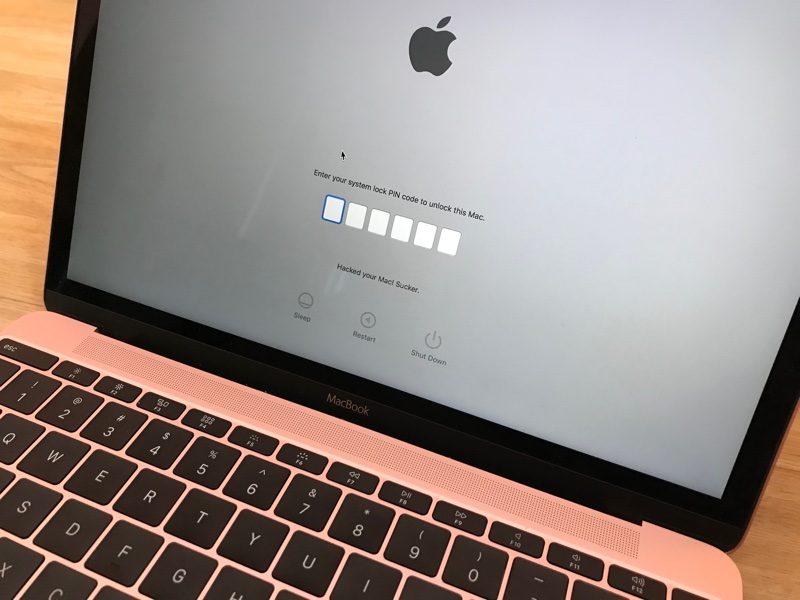
Hackers Using iCloud's Find My iPhone Feature to Remotely Lock Macs and Demand Ransom Payments

Over the last day or two, several Mac users appear to have been locked out of their machines after hackers signed into their iCloud accounts and initiated a remote lock using Find My iPhone.

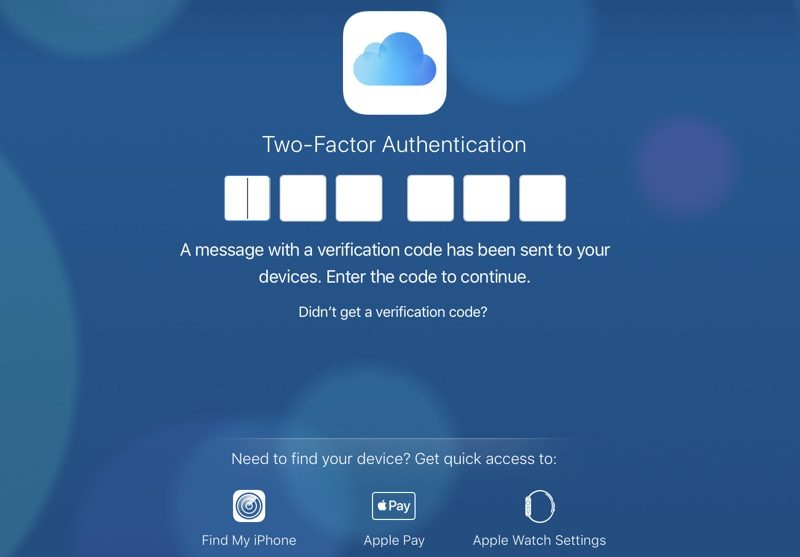
With access to an iCloud user's username and password, Find My iPhone on iCloud.com can be used to "lock" a Mac with a passcode even with two-factor authentication turned on, and that's what's going on here.


Apple allows users to access Find My iPhone without requiring two-factor authentication in case a person's only trusted device has gone missing.


2-factor authentication not required to access Find My iPhone and a user's list of devices.

Affected users who have had their iCloud accounts hacked are receiving messages demanding money for the passcode to unlock a locked Mac device.

Download Doulci iCloud Unlocking Tool 100% Working Free

Download Doulci iCloud Unlocking Tool 100% Working Free

Last on our list, but by no means least effective, is the Doulci iCloud Unlocking Tool. This tool is a little more complicated than the other tools so if you aren’t a tech-savvy person then it may be best to choose another tool.
iCloudin
Pros
    • – This tool is compatible with all iOS devices.
    • – Doulci iCloud Unlocking Tool is free to use.
    – There are a range of tutorials for you to follow if you are unfamiliar with the tool.
Cons
    – In order to download this tool, you must fill out a survey.
Supported iOS
    – iOS 7, iOS 7.1, iOS 8, iOS 9

How to Solve Security Recommendation in WiFi On iPhone

You launch the Settings app and connect to WiFi, but you see “Security Recommendation” below the WiFi network’s name. You think you’re hacked, but don’t sweat – it’s Apple having your back.
wifi security recommendation on iphone
This post highlights why you see the Security Recommendation message and how it was included to safeguard your activity on WiFi networks.

What Really Security Recommendation Implies on iDevice WiFi?

This message appears when you connect to an open WiFi network – a network that doesn’t have a password. When you tap the information icon in blue – the i inside the circle, Apple warns how these networks can be unsafe and why your router should be configured.
Tap this information button to read about Apple’s warning. It says:
Open networks provide no security and expose all network traffic. Configure your router to use WPA2 Personal (AES) security type for this network.

What about Security of Open WiFi Networks?

If the WiFi network isn’t encrypted, a hacker who is trying to steal information of users may be able to snoop on the data being received and sent, including visited webpages and passwords. But this isn’t really an issue in most occasions because if you’re just going through an article on a site you don’t have to login inside, there’s no exchange of information.
secure web on iphone
And it’s easy to see if a website is secure or not. If the URL includes https:// then the “s” stands for secure. Websites that begin with http:// also have good security measures but aren’t considered as secure as https:// ones. A lock icon beside the website name also stands for security.

Types of lock icons – Green & Black

You may see an icon in black color or green color. Both colors could have same encryption level. Green lock means that the website has SSL / CA certificate issue, so the owner is verified.

Anyone can buy an SSL certificate to mimic a legal website, but if one applies for “Extended Validation” certificate, the authority would identify the fake body and deny request. In the end, we recommend not logging into a website that doesn’t have a lock icon in address bar.

So What To Do When “Security Recommendation” Message Appears?

Add a password to the WI-Fi network if you see this message at home, with the WiFi router. Google your WiFi router’s model or see its manual and contact support if you need help.

How to Stay Safe When Connected on WiFi Network

We’ve talked a lot about why the Security Recommendation message appears, and why it isn’t a big deal to worry about on most occasions. But think over the information mentioned above to stay secure.

Cara Agar Ikan Guppy Cepat Beranak

Ikan guppy merupakan ikan yang cepat sekali berkembangbiak dan cara mengembangbiakannya pun sangatlah mudah, Bagaimana agar indukan ikan ...